Aggregators Combines multiple items into a single array.
When you need to collect multiple related records and send them together as a single grouped payload to another system.
Example:
You have multiple invoice line items and want to send them as one complete invoice.
Group By Groups multiple items together based on a shared field.
When you want to organize items by a specific key, like branch, category, or customer, and process each group separately.
Example:
You receive multiple orders from different branches and want to group them by
How to Use It?
1
From Flow Template List
Select and Click on View Flow
2
From Flow Template
Click on this Icon
Click on this Icon
3
Select Aggregator
A prompt window will appear, allowing you to define the Aggregator criteria for your data.

A prompt window will appear, allowing you to define the Aggregator criteria for your data.
4
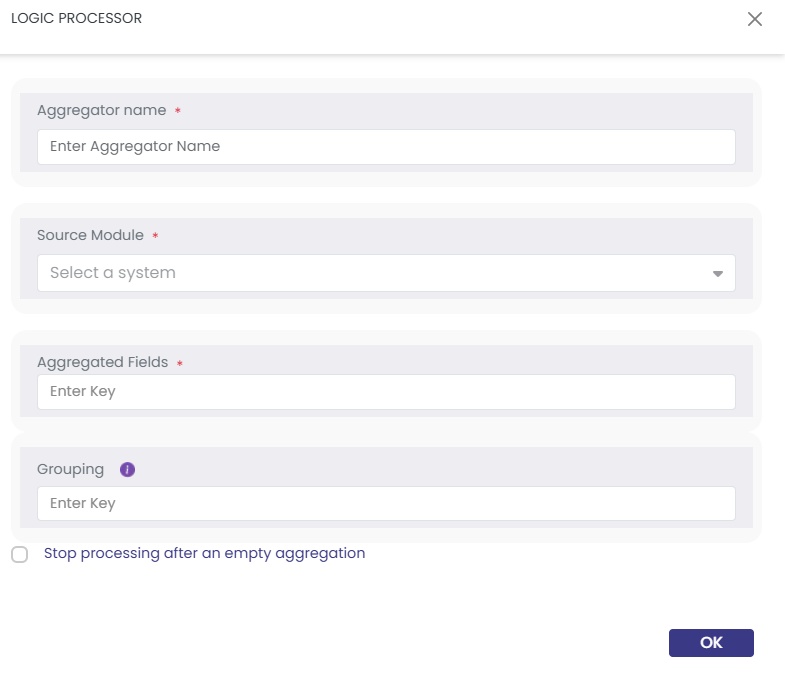
Fill the Aggregator fields.
- Enter a descriptive name for this Aggregator.
- Source Module: Select the module that represents the operation on which this Aggregator is based.
- Aggregated Fields :Define the specific parts of the data or elements within the collection that should be aggregated.
- Grouping : Enables you to define one or more layers of grouping, allowing data to be organized hierarchically based on selected keys.
- Enter a descriptive name for this Aggregator.
- Source Module: Select the module that represents the operation on which this Aggregator is based.
- Aggregated Fields :Define the specific parts of the data or elements within the collection that should be aggregated.
- Grouping : Enables you to define one or more layers of grouping, allowing data to be organized hierarchically based on selected keys.
Important Notes:
There is an Activation checkbox that enables you to stop processing after an empty aggregation.
This prevents the workflow from continuing when no data is returned from the aggregation step.
There is an Activation checkbox that enables you to stop processing after an empty aggregation.
This prevents the workflow from continuing when no data is returned from the aggregation step.
5
Click on Save
Click Save to apply your configuration.
Click Save to apply your configuration.
Related Topics
Was this article helpful?
That’s Great!
Thank you for your feedback
Sorry! We couldn't be helpful
Thank you for your feedback
Feedback sent
We appreciate your effort and will try to fix the article