TABLE OF CONTENTS
- Integration Scope
- 1. Equipment/Truck Flow
- 2. Driver Flow
- 3. Customer/Shipper Flow
- 4. Sales Order/Trip with Water Transport Flow
- 51. Service Order/Trip Flow
- 6. Expected Errors
- 7. General Tips
Integration Scope
The scope of this integration project is to synchronize data between the SAP ERP and Tachyon systems. This ensures a seamless flow of information across different departments and operational processes.
Equipment/Truck
Driver
Customer
Sales Order/Trip
Service Order/Trip
Stock Availability
1. Equipment/Truck Flow
1.1 Description
The Equipment/Truck Flow automates the creation of trucks in Tachyon whenever new equipment is added to SAP ERP. This flow ensures that trucks are consistently represented in both systems, enabling accurate tracking of resources across the organization.
SAP → Tachyon
1.2 Mandatory Fields & Data Format
Field Name | Format | Value/Example |
|---|---|---|
Plate Number | Alphanumeric | [1234 A B C] or [1234 أ ب ج] |
Model Name | Alphabetic | Mitsubishi |
Weight (loadWgt) | Numeric | 1500 |
Internal Order Id | Alphanumeric | AJA2211 |
Equipment Description | Alphanumeric | مرسيدس شاحنة أ ح أ 2211 |
Unit | Default: TO (Ton) | TO |
Istimara Document | Numeric, Min 8, Max 9 digits | 123654789 |
Note: Missing data will result in default values reflected on Tachyon.
2. Driver Flow
2.1 Description
The Driver Flow is designed to keep driver records synchronized between SAP ERP and Tachyon. When a driver is created in SAP, the corresponding information will be automatically reflected in Tachyon.
SAP → Tachyon
2.2 Mandatory Fields & Data Format
Field Name | Format | Value/Example |
|---|---|---|
First Name | Alphabetic | Ahmed |
Last Name | Alphabetic | Mohammed |
Driver License Number | Alphanumeric | 1500 |
Phone Number | Numeric (9 digits), Start with 5*** | 512345678 |
Iqama ID | Numeric, Min 10, Max 11 digits | 1234567890 |
Passport Number | Alphanumeric | AC0491572 |
Nationality | Alphabetic | Pakistani |
Driver License Number | Numeric, Min 10, Max 11 digits | 1234567890 |
Note: Missing data will result in default values reflected on Tachyon.
3. Customer/Shipper Flow
3.1 Description
The Customer/Shipper Flow automates the creation of customer records in SAP ERP whenever a new customer is added in Tachyon.
Tachyon → SAP
3.2 Mandatory Fields & Data Format
Field Name | Format | Value/Example |
|---|---|---|
Customer Type | Dropdown Selection | Shipper |
Company | Alphabetic, max 25 characters | Etihad L.L.C |
VAT Registration Number | Alphanumeric, max 15 characters | 123456789012345 |
Commercial Registration No | Alphanumeric, max 10 characters | 987654321 |
Phone Number | Numeric (9 digits) | 512345678 |
Dischannel | Dropdown Selection | Sister, Local |
Sales Office | Dropdown Selection | SJT1, SDT1 |
Address (Street) | Alphanumeric, max 15 characters | King Abdulaziz St. |
Postal Code | Numeric (5 digits) | 12345 |
District | Alphanumeric, max 15 characters | Al-Riyadh District |
City | Dropdown Selection | Riyadh |
Building Code | Numeric (4 digits) | 1234 |
4. Sales Order/Trip with Water Transport Flow
4.1 Description
The Sales Order/Trip with Water Flow automates the creation of sales orders in SAP ERP whenever a trip for water transportation is delivered in Tachyon.
Tachyon → SAP
4.2 Mandatory Fields & Data Format
Field Name | Format | Value/Example |
|---|---|---|
Trip Type | Dropdown Selection | Normal |
Client (Actor Carrier) | Dropdown Selection | Myself (default) |
Customer (Actor Shipper) | Dropdown Selection | Customer (Sister Company) |
Route Price | Currency (max 4 digits) | 1000 |
Truck Information | Dropdown Selection | Linked from Equipment flow |
Driver Information | Dropdown Selection | Linked from Driver flow |
Sales Office | Dropdown Selection | SJT1, SDT1 |
Loading Type | Dropdown Selection | OR (default) |
Description (Notes) | Alphanumeric, Max 20 characters, Avoid special: [!@#$%^&*()-] | Water delivery to site |
Goods Category | Dropdown Selection | Water (default) |
| Dropdown Selection | Water (default) |
| Numeric | 1 (default) |
| Numeric | Restricted to available Qty |
| Dropdown Selection | Ton (default) |
Note:
The fields Distance and Driver Working Hours should remain empty initially and be completed via the mobile app upon trip delivery.
Avoid using "Myself" in the Customer (Actor Shipper) field when creating a trip, as it is not acceptable in the integration process. Instead, select a valid customer from the dropdown list to ensure proper synchronization.
All other fields can be freely used.
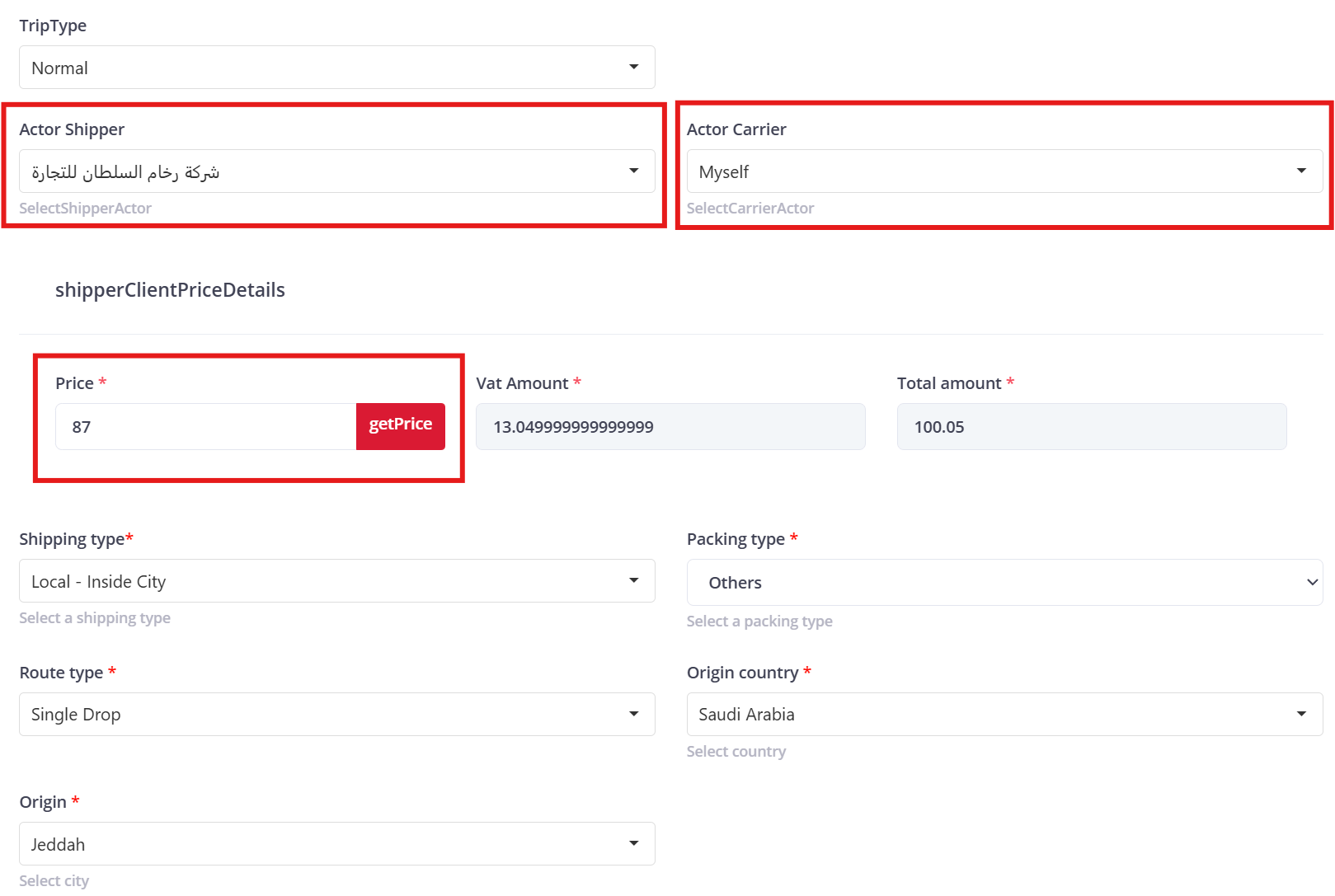
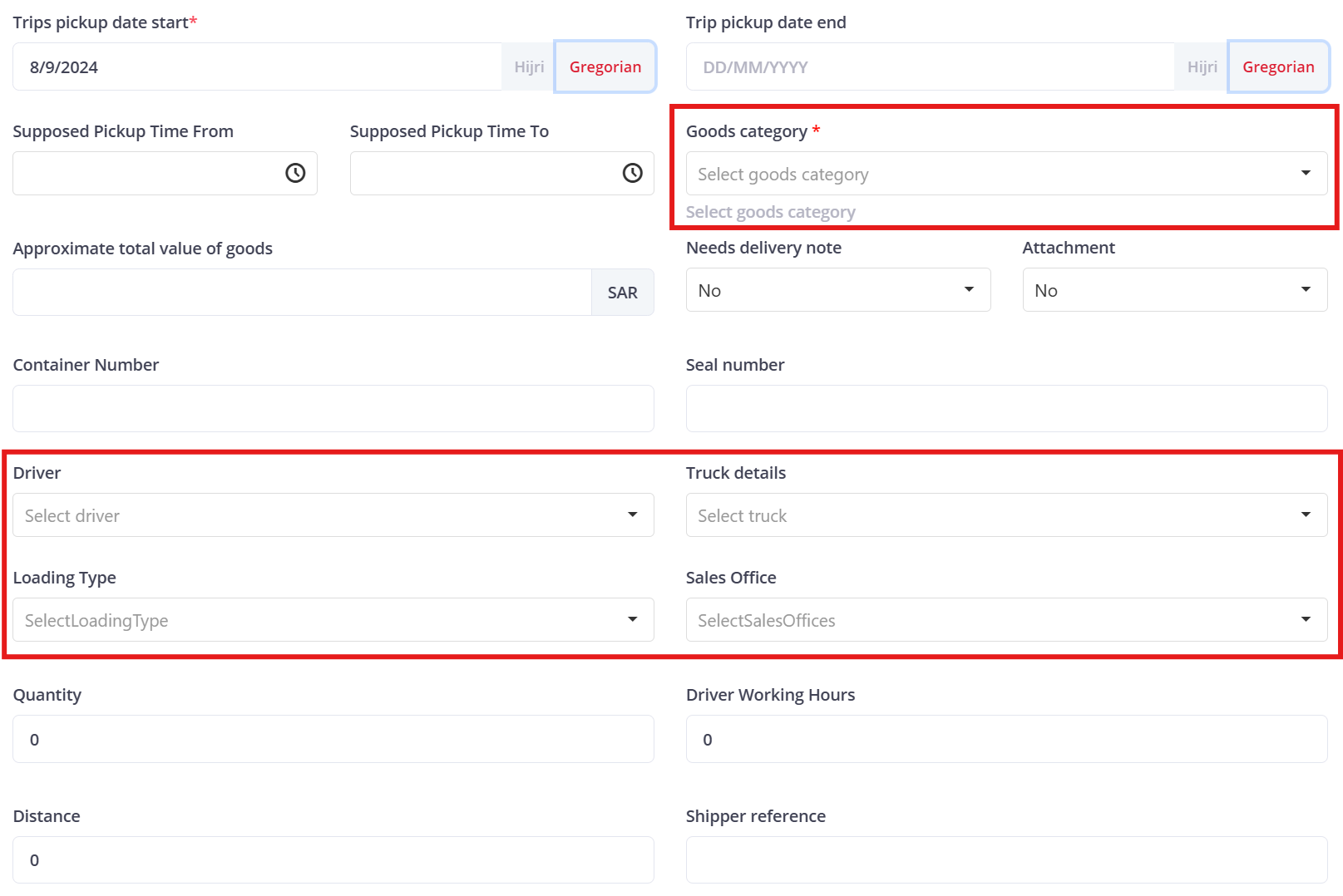
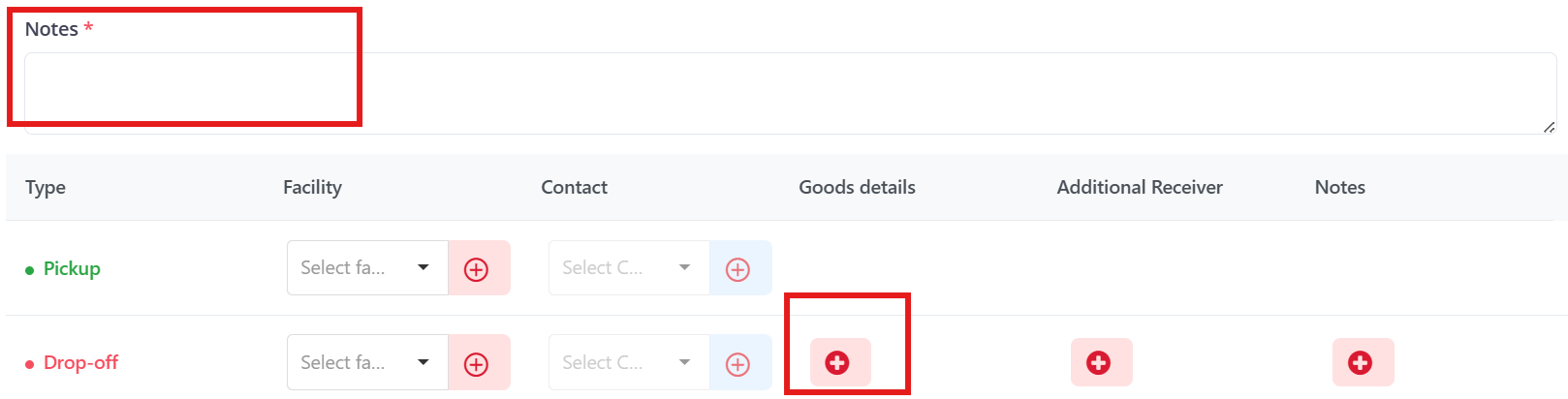
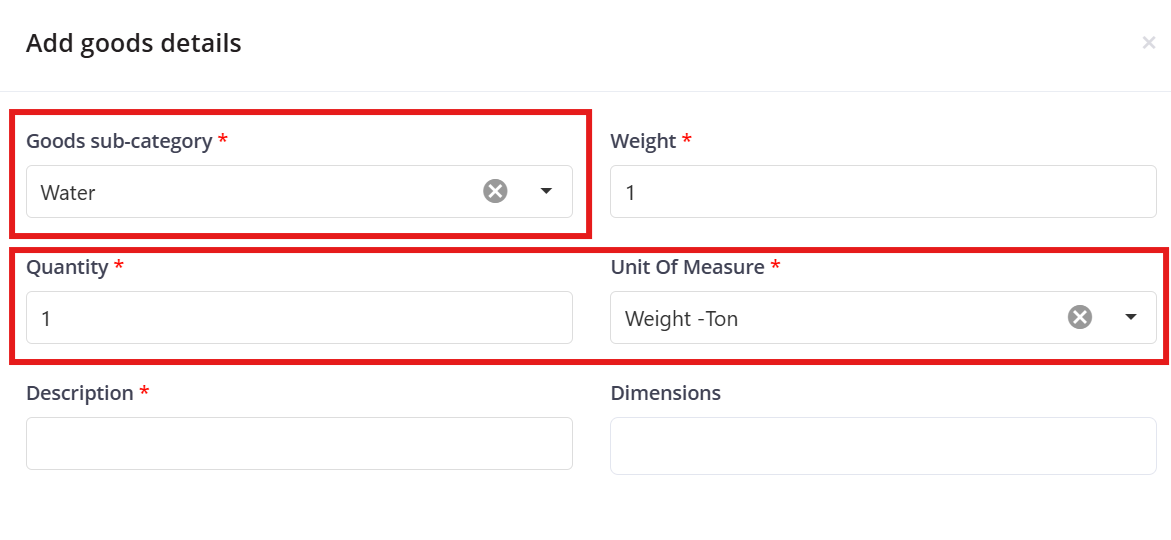
All the Red boxes are mandatory for the integration to work seamlessly.
51. Service Order/Trip Flow
5.1 Description
The Service Order/Trip Flow automates the creation of service orders in SAP ERP whenever a trip is delivered to a customer in Tachyon.
Tachyon → SAP
5.2 Mandatory Fields & Data Format
Field Name | Format | Value/Example |
|---|---|---|
Trip Type | Dropdown Selection | Normal |
Client (Actor Carrier) | Dropdown Selection | Myself |
Customer (Actor Shipper) | Dropdown Selection | Linked from customer flow |
Route Price | Currency (max 4 digits) | 1000 |
Truck Information | Dropdown Selection | Linked from Equipment flow |
Driver Information | Dropdown Selection | Linked from Driver flow |
Sales Office | Dropdown Selection | SJT1, SDT1 |
Loading Type | Dropdown Selection | MB, OR, CR, .. |
Description (Notes) | Alphanumeric, Max 20 characters, Avoid special: [!@#$%^&*()-] | General goods delivery 1 |
Goods Category | Dropdown Selection | Others |
Goods Sub-category | Dropdown Selection | Others |
Goods Quantity | Numeric, Max 4 digits | Any |
Unit of Measure | Dropdown Selection | Any |
Note:
The fields Goods Category and Goods Sub-category are set to "Others" as their type is already specified in Loading Type.
The fields Distance and Driver Working Hours should remain empty initially and be completed via the mobile app upon trip delivery.
Avoid using "Myself" in the Customer (Actor Shipper) field when creating a trip, as it is not acceptable in the integration process. Instead, select a valid customer from the dropdown list to ensure proper synchronization.
All other fields can be freely used.
6. Expected Errors
6.1 Description
This section consolidates all the expected errors that may arise during the integration process. Understanding these errors will help in troubleshooting and ensuring the smooth operation of the system.
6.2 Events
Unlinked Entity Errors:
Description: Occurs when Customers created in Tachyon are not yet synchronized with SAP.
Solution: Ensure that all entities in Tachyon are synched with SAP before initiating further operations. Regularly check for un synched data.
Missing Data Errors:
Description: Triggered when mandatory fields are left blank or filled with incorrect data formats.
Solution: Double-check that all required fields are populated with the correct data format before attempting to save or sync records.
Manually Added Entities on Portals:
Description: Errors arise when trucks or drivers are manually added directly on Tachyon instead of being synchronized from SAP.
Solution: Avoid manual entries in Tachyon and ensure all data is correctly entered in SAP for automatic synchronization.
Invalid Company in Sales Order:
Description: Using a local company in a sales order, which is not valid in SAP (only sister companies are accepted).
Solution: Ensure that only sister companies are selected in the sales order process. Verify company Dichannel before proceeding with the order.
7. General Tips
7.1 Email Notifications:
Email alerts will be sent when errors occur during synchronization, ensuring prompt awareness and resolution.
7.2 Trip Synchronization:
Only trips marked as "delivered" in Tachyon will be synched as orders in SAP. The synch event occurs when the trip is marked as delivered.
7.3 Scheduled Synchronization:
Customer, driver, and truck/equipment data synchronization is done on a regular schedule. Regularly check the system to ensure all data is synched correctly.
Was this article helpful?
That’s Great!
Thank you for your feedback
Sorry! We couldn't be helpful
Thank you for your feedback
Feedback sent
We appreciate your effort and will try to fix the article