Filters used to Filter data based on specific criteria. use to exclude or include certain records in the flow.
Example: Only process records where status = "active".
A prompt window will appear, allowing you to define the filtering criteria for your data.
How to Use It?
1
From Flow Template List
Select and Click on View Flow
2
From Flow Template
Click on this Icon
Click on this Icon
3
Select Filters
A prompt window will appear, allowing you to define the filtering criteria for your data.

A prompt window will appear, allowing you to define the filtering criteria for your data.
4
Fill the filter fields.
- Enter a descriptive name for this filter.
- Key: Specify the field you want to filter by (e.g.,
- Filter Type :Choose the type of filter condition (e.g., Greater Than, Is Not Empty, Equals, etc.).
- Value : Enter the value that the filter should be based on.
- You can add additional conditions using AND or OR to create more complex filtering logic.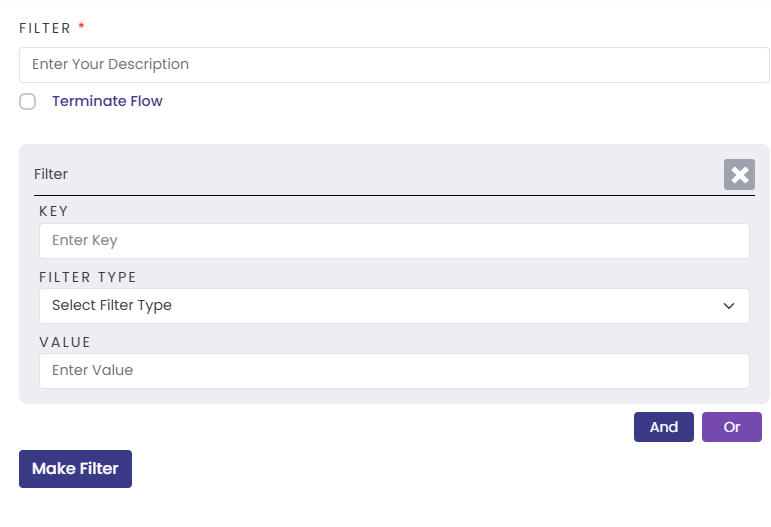
- Enter a descriptive name for this filter.
- Key: Specify the field you want to filter by (e.g.,
voided_date to find voided orders). - Filter Type :Choose the type of filter condition (e.g., Greater Than, Is Not Empty, Equals, etc.).
- Value : Enter the value that the filter should be based on.
- You can add additional conditions using AND or OR to create more complex filtering logic.
5
Click on Make Filter And Save your change
Click Save to apply your configuration.
Click Save to apply your configuration.
Related Topics
Was this article helpful?
That’s Great!
Thank you for your feedback
Sorry! We couldn't be helpful
Thank you for your feedback
Feedback sent
We appreciate your effort and will try to fix the article