
Array Mapping
Arrays require special handling in data mapping. This article explains how to work with arrays in Studio and why they need different techniques than standard field mapping.
Understanding Array Structure
An array is a list of items grouped together. There are two types:
Simple Array
Contains one or more values of the same type (integers, strings, etc.):
Array of Objects
Contains collections with multiple properties:
{"name": "Laptop", "price": 1000, "qty": 2},
{"name": "Mouse", "price": 25, "qty": 5}
]
Arrays use square brackets [] with numbers to access specific elements. Index starts at 0.
Array Notation and Indexing
| Notation | Meaning |
|---|---|
| [0] | First element |
| [1] | Second element |
| [2] | Third element |
| items[] | First item (empty brackets default to first element) |
| items[].name | Name property from the first item |
Mapping: items[]
Result: "Apple"
Understanding Array Mapping
In standard data mapping, you connect one field to one field:
Arrays are different because they contain multiple items:
Destination: line_items[] → Needs 5 products
Example:
An order contains three products: Laptop, Mouse, and Keyboard.
The goal: Create an invoice that contains all products in the accounting system.
✕ Output without array mapping
"line_item_name": "Laptop",
"line_item_quantity": 1,
"line_item_price": 1000
}
Only the first item (Laptop) is sent. Mouse and Keyboard are omitted. Standard mapping handles single fields, not arrays.
✓ Output with array mapping
"line_items": [
{ "name": "Laptop", "quantity": 1, "price": 1000 },
{ "name": "Mouse", "quantity": 2, "price": 25 },
{ "name": "Keyboard", "quantity": 1, "price": 75 }
]
}
All items are included in the invoice. Array mapping ensures the entire product list is processed and transferred correctly.
loopOverItems Handler
The loopOverItems handler processes each item within a list or array mapping from the source to the destination, ensuring all items are handled during flow execution.
Example:
The data from the source step:
"items": [
{ "name": "Laptop", "quantity": 1, "price": 1000 }, // First product
{ "name": "Mouse", "quantity": 2, "price": 25 }, // Second product
{ "name": "Keyboard", "quantity": 1, "price": 75 } // Third product
]
}
The handler in the mapping to the destination:
The output of the destination after applying the loopOverItems handler:
For more details, go to Array Handlers →
Iterator and Aggregator
For advanced array processing beyond simple mapping, use Iterator and Aggregator logic processors to apply complex transformations to each item, iterate on each item using Iterator, filter items based on specific conditions, perform calculations on each item separately, and combine results after processing using Aggregator.
For more details, go to Advanced Mapping →
Iterator vs loopOverItems
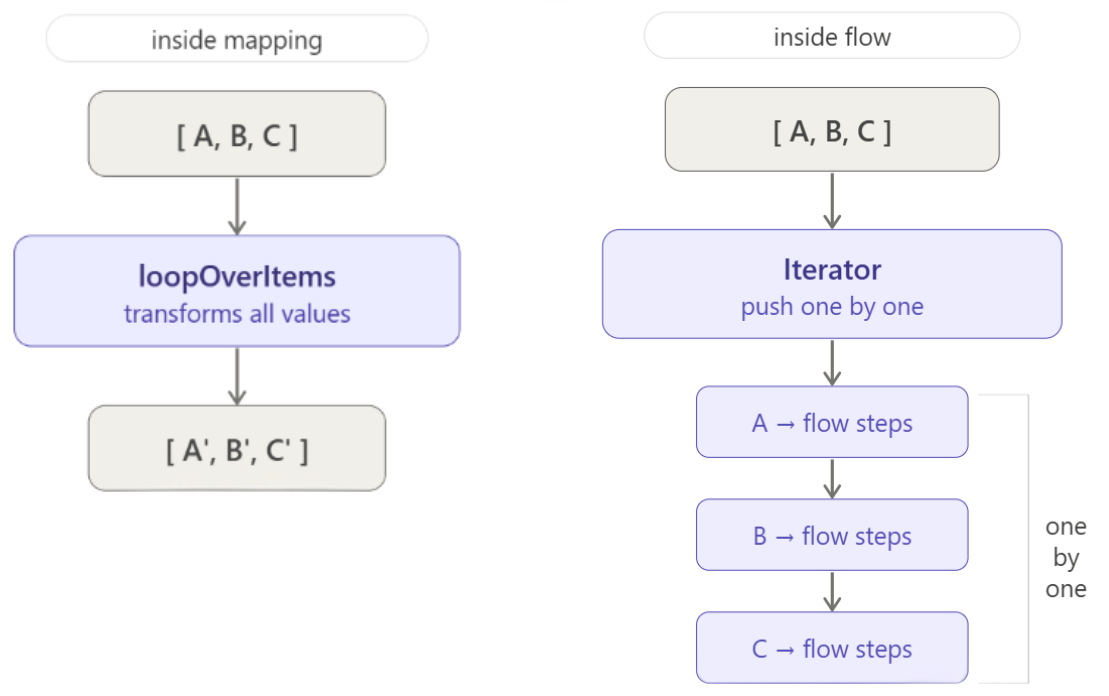
| Aspect | loopOverItems | Iterator |
|---|---|---|
| Definition | Handler used in mapping | Logic Processor used in the flow |
| Role | Processes array values during mapping and converts them into destination fields | Pushes each object separately through the flow steps |
| Complexity | Simple direct transformation | Advanced — includes logic and processing per item |
| Result | Entire array is transformed during mapping | Each item follows its own execution path in the flow |
Related Topics