
Array Handlers
Array Handlers in Studio are predefined functions used to search, sort, filter, transform, and manipulate arrays (lists) of items during the mapping process.
Array handlers can be selected directly inside flow mapping operations. Click any destination field in the mapping panel, open the handler picker, and choose the array function you need — the handler runs inline as part of the mapping step without requiring a separate logic processor.
Accessing Array Handlers
Click on any destination field in the mapping panel
A pop-up window opens titled "FUNCTION FOR WORKING WITH AN ARRAY"
You'll see two sections:
- Handlers — Available array functions
- Keywords — Sort keywords (Asc, Desc)
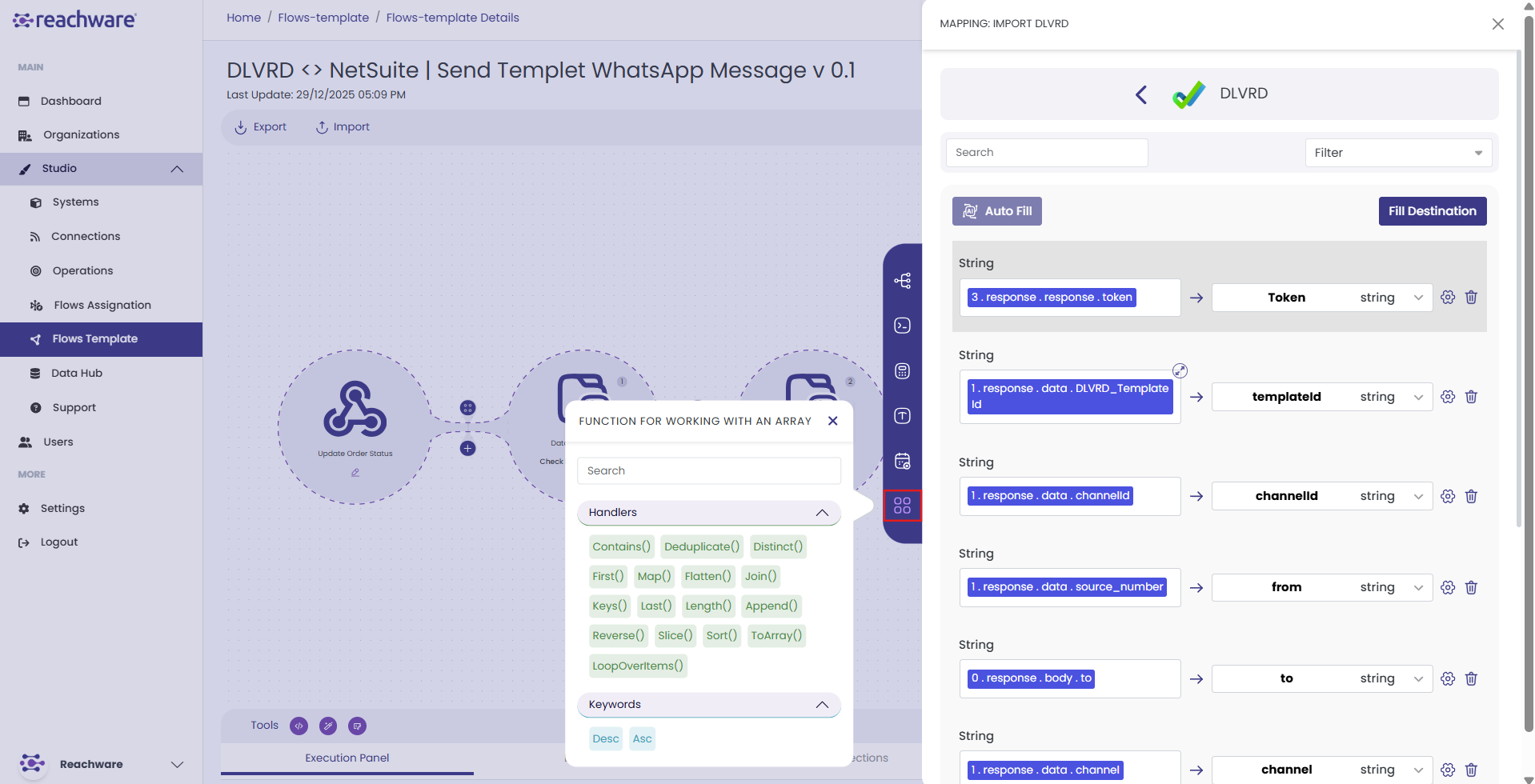
Available Array Handlers
append()
Combines multiple arrays into one.
Example
// Output
["123", "456", "789", "234", "567", "890"]
contains()
Checks whether a specified value exists within an array. Returns true if found, false otherwise. For objects, the element must match exactly (same structure and values).
Example
deduplicate()
Removes duplicates from an array. For objects, duplicates are removed only when the objects are fully identical (same keys, same values, same structure).
Example
distinct()
Returns a new array of objects with duplicates removed based on the specified property key. Only supported for arrays of objects.
- array — The source array of objects
- key — The property to use for comparison
Example
[{ "id": 1, "name": "Alice" }, { "id": 2, "name": "Bob" }, { "id": 1, "name": "Alice" }]
distinct(array; "id")
// Output
[{ "id": 1, "name": "Alice" }, { "id": 2, "name": "Bob" }]
first()
Retrieves the first element from an array. Works with arrays of simple values (strings, numbers) or objects.
Example
// Output
"email1@example.com"
last()
Returns the last element of the specified array. Works with arrays of integers, strings, and objects.
Example
// Output
"email3@example.com"
length()
Returns the number of items in an array. Works with arrays of integers, strings, and objects.
Example
map()
Extracts specific values from each element in an array. Can optionally filter results by another field.
- complex array — Your array, e.g.
Items[] - key — Which field to extract, e.g.
product_id - [key for filtering] (optional) — Another field to filter by
- [possible values for filtering] (optional) — Which values of the filter key to include
Example — Extract a field from all items
// Output
["123", "456", "789"]
Example — Extract with filter (quantity = 4)
// Output: prices of items where quantity = 4
[10]
flatten()
Takes a multi-dimensional array (an array of arrays) and collapses it into a single one-dimensional array.
Example
[["tag1", "tag2"], ["tag3", "tag4"], ["tag5"]]
flatten(array)
// Output
["tag1", "tag2", "tag3", "tag4", "tag5"]
join()
Concatenates the elements of an array into a single string, inserting the given delimiter between each element. Works with arrays of strings or values that can be converted to text.
Example
// Output
"Product A, Product B, Product C"
keys()
Returns an array of a given object's property names (keys).
Example
{ "name": "John", "age": 30, "city": "New York" }
keys(user)
// Output
["name", "age", "city"]
sort()
Orders the elements of an array in ascending or descending order. Works with arrays of integers, strings, and objects.
- array — The source array
- order —
"asc"(A→Z / 0→9) or"desc"(Z→A / 9→0) - key (optional) — The field to sort by when sorting an array of objects
Example — Simple array
// Output
[8, 5, 4, 2, 1]
Example — Array of objects
// Sorts contacts alphabetically by name
toArray()
Converts an object into an array of key-value pairs.
Example
{ "name": "Leena", "city": "Riyadh", "active": true }
toArray(Customer)
// Output
[{ "key": "name", "value": "Leena" }, { "key": "city", "value": "Riyadh" }, { "key": "active", "value": true }]
loopOverItems()
Processes each item within a list or array, mapping from source to destination so that all items are handled during flow execution. Standard mapping only picks up the first item — loopOverItems iterates through every element.
Related Topics