
Summarize
Summarize performs calculations on grouped data to get totals, averages, maximums, or minimums. Use it to aggregate numeric values by category, date, branch, or any grouping key.
How to Add Summarize?
1
Click the Logic Processor icon between operations
2
Select Summarize
3
Configure settings
4
Click Save
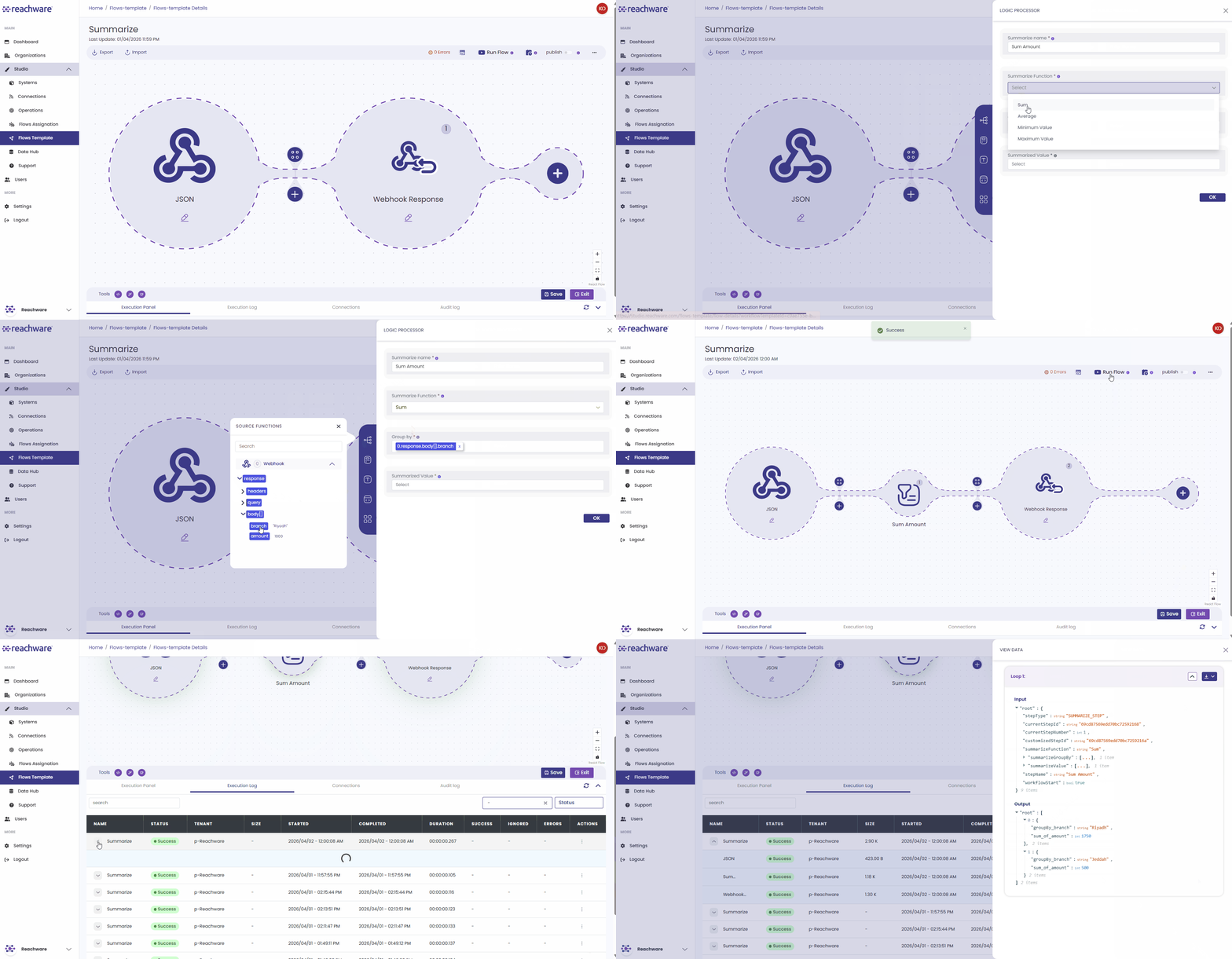
Configuration
| Field | Description | Required |
|---|---|---|
| Summarize Name | Descriptive name | Yes |
| Summarize Function | Calculation type | Yes |
| Group By | Field to group by | Optional |
| Summarized Value | Numeric field to calculate | Yes |
Summarize Functions
| Function | Description | Example Output |
|---|---|---|
| Sum | Total of all values | Total sales = 15,000 |
| Average | Mean value | Average price = 250 |
| Maximum Value | Highest value | Max order = 5,000 |
| Minimum Value | Lowest value | Min price = 10 |
How It Works?
Without Grouping
Calculates across all records.
Function: Sum
Summarized Value: price
Input:
[
{ "price": 100 },
{ "price": 200 },
{ "price": 150 }
]
{ "price": 100 },
{ "price": 200 },
{ "price": 150 }
]
Output:
{
"sum_price": 450
}
"sum_price": 450
}
With Grouping
Calculates separately for each group.
Function: Sum
Group By: branch
Summarized Value: amount
Input:
[
{ "branch": "Riyadh", "amount": 1000 },
{ "branch": "Jeddah", "amount": 500 },
{ "branch": "Riyadh", "amount": 750 }
]
{ "branch": "Riyadh", "amount": 1000 },
{ "branch": "Jeddah", "amount": 500 },
{ "branch": "Riyadh", "amount": 750 }
]
Output:
{
"Riyadh": { "sum_amount": 1750 },
"Jeddah": { "sum_amount": 500 }
}
"Riyadh": { "sum_amount": 1750 },
"Jeddah": { "sum_amount": 500 }
}
Multiple Summarized Values
You can aggregate multiple fields at once.
Function: Sum
Group By: branch
Summarized Values: price, quantity
Output:
{
"Riyadh": {
"sum_price": 2500,
"sum_quantity": 150
}
}
"Riyadh": {
"sum_price": 2500,
"sum_quantity": 150
}
}
Related Articles