
XML Converter
XML Converter transforms data between XML and JSON formats. Use when integrating with systems that require XML or when parsing XML responses.
How to Add a XML Converter?
Click the Logic Processor icon in your flow
Select XML Converter from the list
Configure the data
Click Ok to save
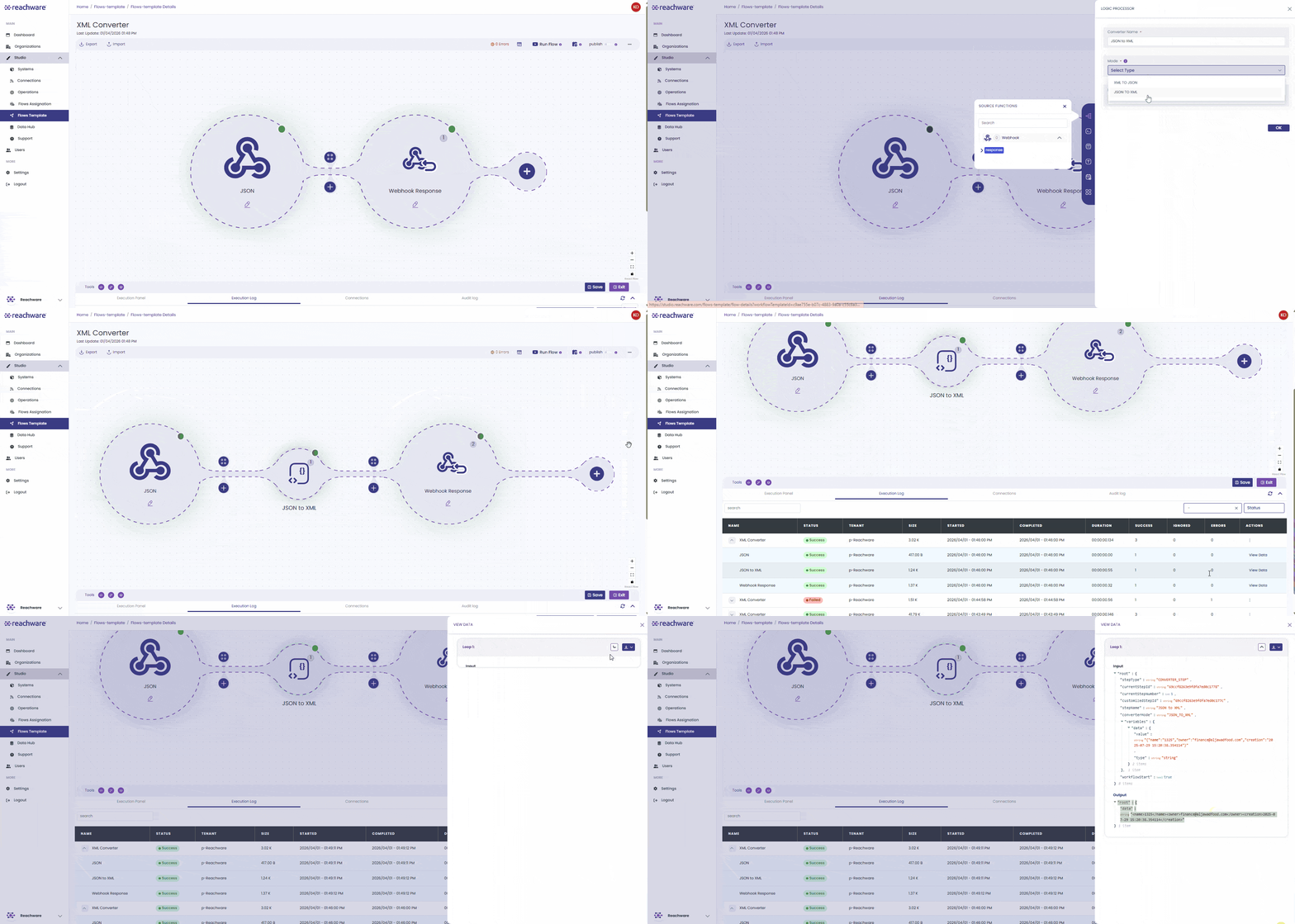
Configuration
| Field | Description | Required |
|---|---|---|
| Name | Name for the conversion step in the flow | Yes |
| Mode | Direction of conversion: XML → JSON or JSON → XML | Yes |
| Data | The input data (XML or JSON) to convert | Yes |
Conversion Modes
| Mode | Use When |
|---|---|
| XML → JSON | You need to map XML fields or transform incoming XML data into standard JSON structures. |
| JSON → XML | You need to create XML requests or SOAP payloads to send to external systems. |
Key Conversion Rules
XML → JSON
Nested objects
Arrays become repeated elements
<Item>Apple</Item>
<Item>Orange</Item>
</Items>
Attributes use @_ prefix
Null values
JSON → XML
Nested objects
Arrays become repeated elements
<Item>Apple</Item>
<Item>Orange</Item>
</Items>
Attributes from @_ prefix
Null values
Advanced Settings
The default conversion rules work for most APIs, but some systems expect a specific JSON or XML shape. Open the Advanced Settings panel on the XML Converter to fine-tune how attributes, arrays, whitespace, and the root element are handled.
You rarely need to touch more than one or two of these. Use this as a quick guide:
XML → JSON Settings
| Setting | Default | What It Does |
|---|---|---|
| Explicit Array | Off | Turn on to always wrap child nodes in an array, even when there's only one, useful when your mapping expects a list and a single-item payload would otherwise break it. |
| Attribute Key | $ | The JSON key used to hold XML attributes. Change it if your destination expects a different prefix, like @. |
| Character Key | #value | The JSON key used to hold text content when an element has both attributes and text. |
| Explicit Root | On | When on, the root element stays in the JSON. Turn off to unwrap it so its children become the top-level keys. |
| Ignore Attributes | Off | Turn on to discard all XML attributes and keep only text content, useful when you only care about the values. |
| Merge Attributes | Off | Turn on to flatten attributes into the parent element instead of nesting them under the Attribute Key. Has no effect if Ignore Attributes is on. |
| Normalize | Off | Collapse multiple spaces, tabs, and line breaks inside text into single spaces. |
| Trim | Off | Remove leading and trailing whitespace from text values. |
| Normalize Tags | Off | Convert all tag names to lowercase in the JSON output. |
Example: Explicit Root
<Order>
<Customer>Ali</Customer>
<Total>50.00</Total>
</Order>
// Explicit Root = ON
{ "Order": { "Customer": "Ali", "Total": "50.00" } }
// Explicit Root = OFF
{ "Customer": "Ali", "Total": "50.00" }
Example: Merge Attributes
<Product id="P1"><Name>Mouse</Name></Product>
// Merge Attributes = OFF
{ "Product": { "$": { "id": "P1" }, "Name": "Mouse" } }
// Merge Attributes = ON
{ "Product": { "id": "P1", "Name": "Mouse" } }
Example: Trim & Normalize
<Customer> Ali Hassan </Customer>
// Trim = ON
{ "Customer": "Ali Hassan" }
// Normalize = ON
{ "Customer": " Ali Hassan " }
// Trim = ON, Normalize = ON
{ "Customer": "Ali Hassan" }
JSON → XML Settings
| Setting | Default | What It Does |
|---|---|---|
| Attribute Key | $ | Tells Studio which JSON key holds XML attributes. Must match what your source JSON uses. |
| Character Key | #value | Tells Studio which JSON key holds the text content of an element. |
| Headless | Off | Turn on to omit the <?xml ?> declaration at the top. Some APIs (especially SOAP wrappers) reject requests that include it. |
| Root Name | root | The name of the wrapping element in the XML output. Change this to match what the target system expects (for example, Order or Envelope). |
Example: Headless
{ "Order": { "id": "123", "Customer": "Ali" } }
// Headless = OFF (default)
<?xml version="1.0" encoding="UTF-8"?>
<Order>
<id>123</id>
<Customer>Ali</Customer>
</Order>
// Headless = ON
<Order>
<id>123</id>
<Customer>Ali</Customer>
</Order>
Example: Root Name
{ "OrderID": "123" }
// Root Name = root (default)
<root><OrderID>123</OrderID></root>
// Root Name = Order
<Order><OrderID>123</OrderID></Order>
Related Articles