
Flow Path
Flow Path creates conditional branches in your flow, routing records to different paths based on conditions. As "if-then-else" logic that splits your flow into multiple directions.
How to Add Flow Path?
1
Click the Logic Processor icon between operations
2
Select Flow Path
3
Configure settings
4
Click Save
Configuration
| Field | Description | Required |
|---|---|---|
| Name | Name for this Flow Path | Yes |
| Description | Purpose of this Flow Path | No |
| Flow Path Type | How records match paths | Yes |
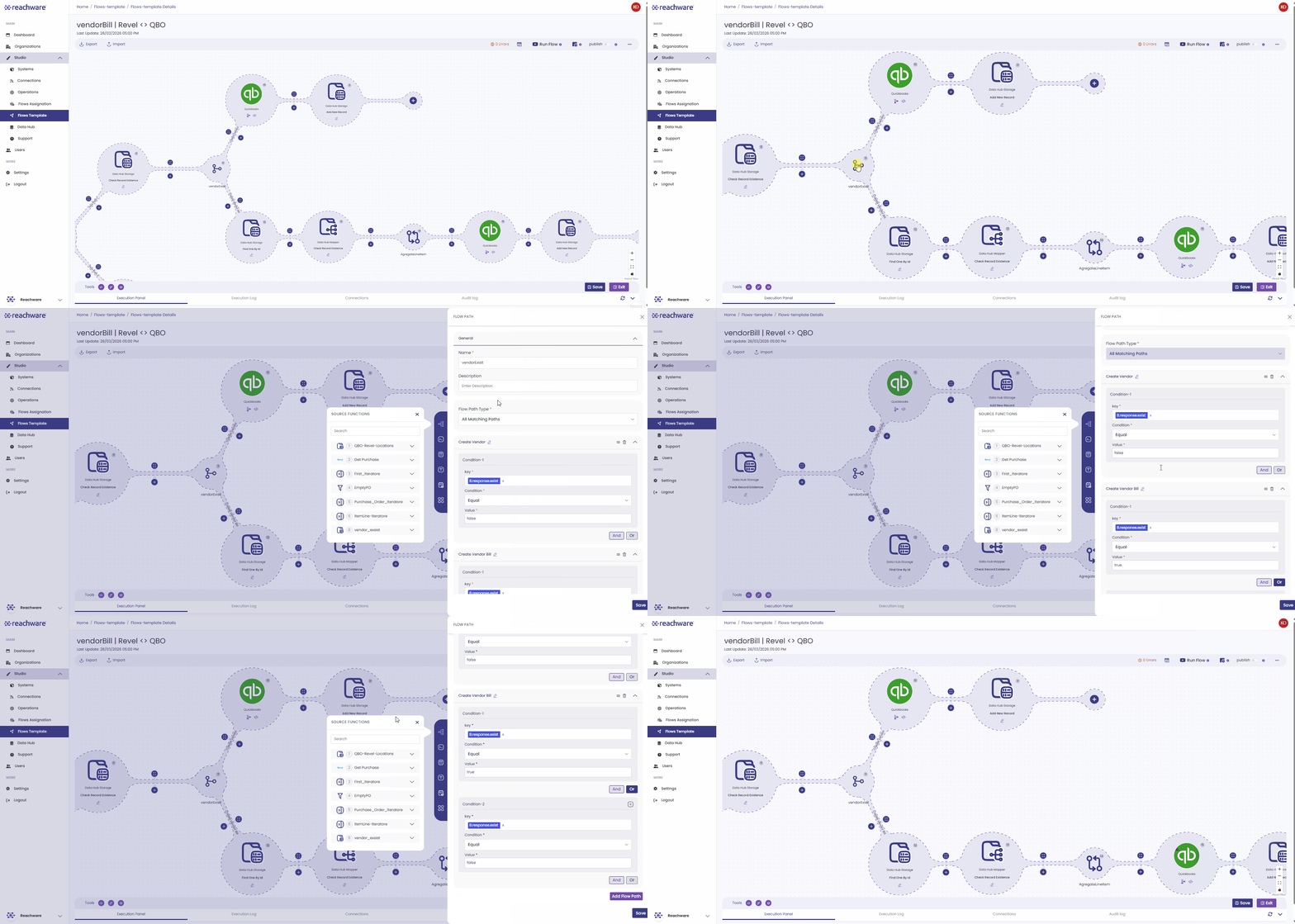
Example: Does the Vendor Exist?
The system checks a True/False condition to choose the right path:
- If FALSE (New Vendor): The system follows the "Create Vendor" path. It builds a new vendor.
- If TRUE (Existing Vendor): The system follows the "Create Vendor Bill" path and goes straight to processing their invoice.
Flow Path Types
First Matching Path
Records stop at the first matching condition.
How it works:
- Evaluates paths in order (Path 1, Path 2, Path 3...)
- When a condition matches, record goes to that path
- Stops checking remaining paths
- Similar to IF...ELSE IF...ELSE
All Matching Paths
Records flow through every matching path in sequence.
How it works:
- Checks all path conditions
- Record flows through ALL matching paths
- Executes paths one by one (sequentially)
- Similar to multiple independent IF statements
Path Configuration
Minimum Requirements
- Must have at least 2 paths to save
- Each path must have at least 1 condition
- Each condition must be filled (Key, Condition, Value)
Path Settings
Each path includes:
- Path Name: Default "Flow Path-1", "Flow Path-2" (editable)
- Conditions: One or more conditions (AND/OR logic)
- Operations: Steps to execute when matched
Condition Types
| Condition | Description | Example |
|---|---|---|
| Greater than | Value > number | Total > 1000 |
| Less Than | Value < number | Quantity < 10 |
| Contain | Text contains substring | Email contains "@gmail" |
| Exact | Exact match | Status = "active" |
| Is Empty | Field is empty | Email is empty |
| Is not Empty | Field has value | Phone is not empty |
| Equal | Value equals | Type = "VIP" |
| Not Equal to | Value doesn't equal | Status ≠ "cancelled" |
| Start With | Text starts with | Phone starts with "+966" |
| End With | Text ends with | Email ends with ".com" |
Multiple Conditions
AND Logic:
Customer Type = "VIP" AND Order Total > 10000
Both must be true
OR Logic:
Priority = "urgent" OR Status = "critical"
At least one must be true
Add more conditions: Click AND or OR button
After Saving
Once saved:
- Flow Path structure appears visually in flow
- Each path shows its name
- You can add operations to each path
Related Articles